
Adam Spigel | August 8, 2025
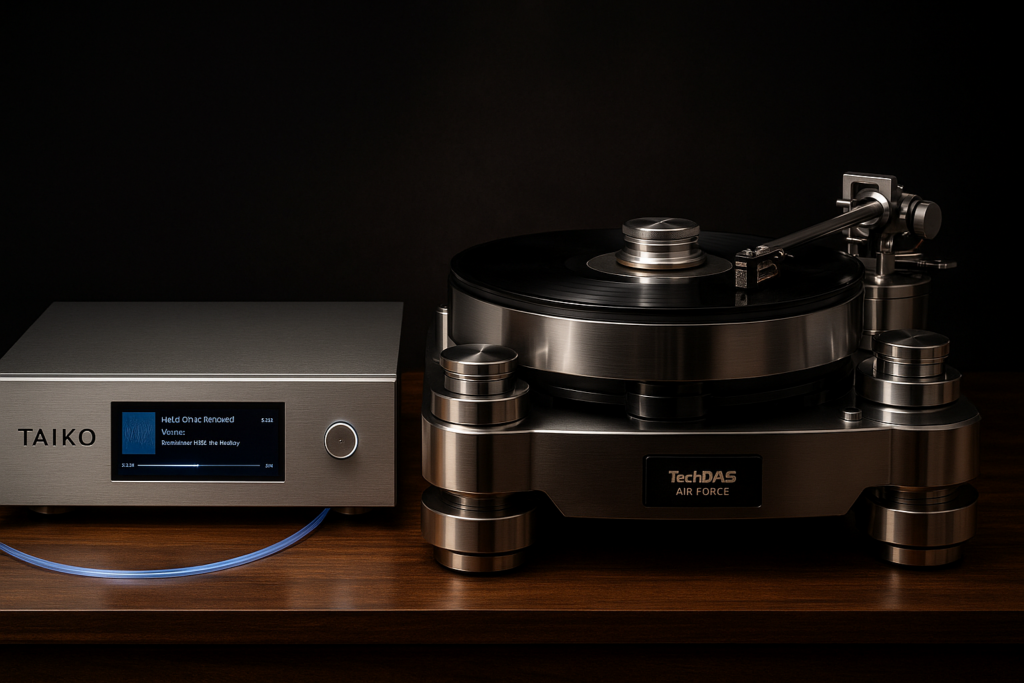
When my friend Don read my post walking through the series of upgrades I’ve made to my digital front end—each one unlocking a new layer of performance—he had just one question: “Where do I even start?”
It’s a fair point. The upgrade path can be daunting, and without a clear roadmap, it’s easy to get lost chasing the wrong improvements first. Think of your digital front end like a layered cake: if the base layer is flawed, no amount of extravagant icing will save it. Personally, I prefer mousse over icing—I like my audio rich but not overly sweet—but that’s beside the point.
Each step in the chain matters, and in the right order, the gains can be cumulative and transformative. I may later link to my Dual-DSD reference recordings to let you hear the difference for yourself, but for now, let’s start simple. Imagine a single-layer, store-bought cake—uninspiring, perhaps even questionable in its appeal. That’s your starting point before the upgrades begin.
One scenario I encounter all too often is the audiophile who has invested heavily in a reference-grade streamer and DAC—sometimes a setup worth as much as a small car—yet is still relying on the noise-laden, budget-issue modem/router combo rented from their internet provider.:
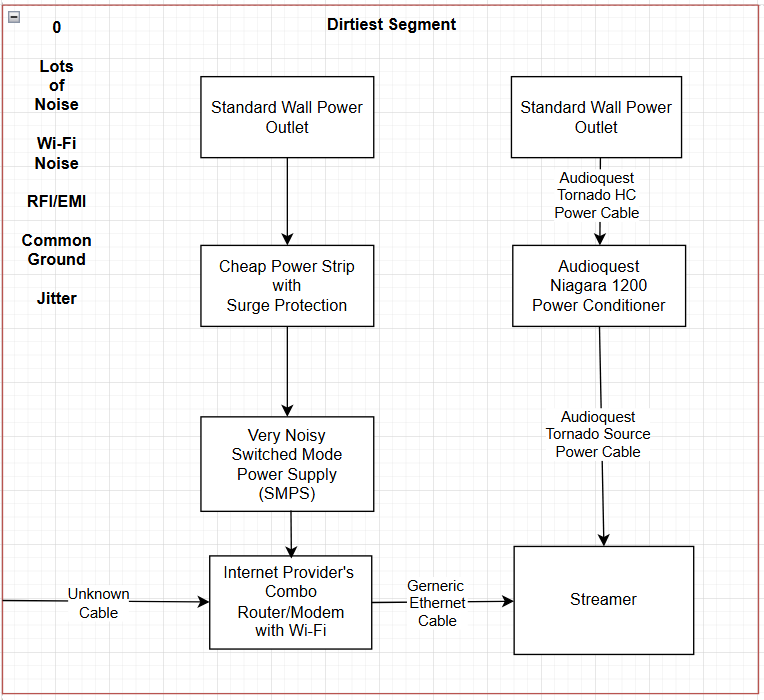
The Problem:
ISP-provided modems—especially the all-in-one modem/router combos—introduce several issues that make them a weak link in a high-end streaming chain, and most of it comes down to cheap, non-audiophile parts and noisy design choices.
ISP combo boxes cut costs with noisy switch-mode power supplies, jitter-ridden clocks, and unshielded components—flooding your network with electrical noise before the music even starts.
Through a series of recordings and critical listening sessions, I’ve been able to identify the upgrades that consistently deliver better streaming sound quality. What follows is the path I’ve found—ranked from the most affordable tweaks to the most extravagant investments—each step verified in my own system and captured in reference recordings.
Step 1: Power Conditioning on Network Gear
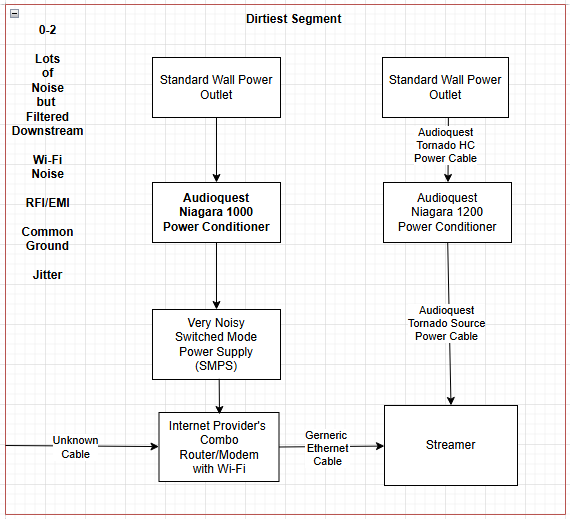
<changes in bold>
The first step is to ensure your networking components—whether it’s an ISP combo unit, a dedicated modem and router, or a fiber media converter—are fed by the cleanest power possible. Lowering noise at this stage lays the groundwork for every improvement that follows.
Why This Matters:
Electrical noise from your modem or router can ride over Ethernet straight into your streamer or DAC. Addressing it at the source with proper power conditioning not only lowers the noise floor but also preserves clarity, dynamics, and tonal purity.
Result:
This helps with very noisy switched mode power supply (SMPS) used by most of these devices. This at least gets rid of some of the hash that is making it to your very sensitive DAC and the clocks in your router and DAC. Something like a Niagara 1000 with its wideband filtration which helps with the SMPS.
Parts list, price and where to purchase:
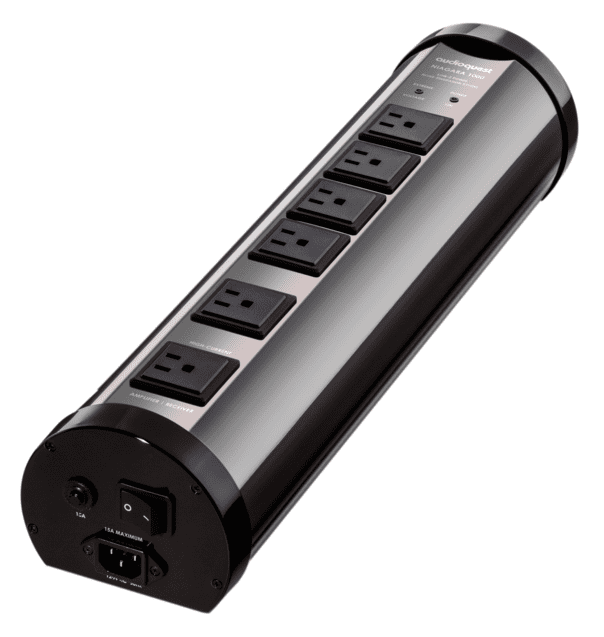
Audioquest Niagara 1000: Used 500-800, US Audiomart, Audiogon, Ebay
not as aggressive with high frequency protection or common-mode noise rejection. Series Mode Filtering does help stop high-frequency noise that gets injected back onto the shared AC ground affecting everything like your DAC or server, even if isolated with fiber, helps with common-mode + differential rejection that affects the rest of your system through AC ground, helps with clock stability in routers, decreases jitter. Noise containment, RFI and EMI – helps with jitter. Helps stop packet timing irregularities, less micro-jitter. More budget friendly.
If It Were My System:
For a budget-friendly starting point, I’d look for a used AudioQuest Niagara 1000 or 1200. For a clear step up in performance, the Shunyata Gemini is an outstanding choice. And if cost is no object, the Shunyata Denali or Everest delivers reference-level conditioning.
Alternatives:
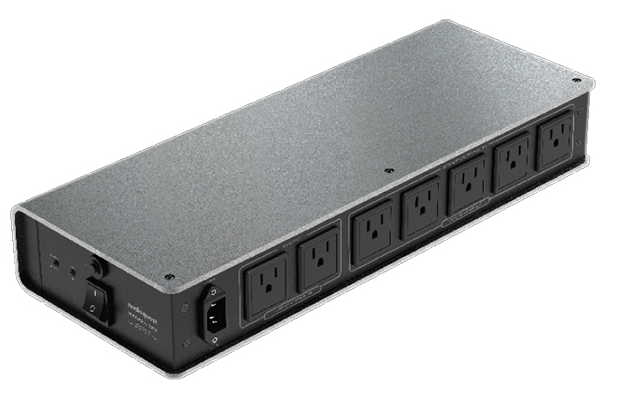
Audioquest Niagara 1200: Used 700-800, US Audiomart, Audiogon, Ebay
lowers the noise floor even more. even wider bandwidth filtration, better internal grounding topology. Niagara is more designed to protect what is plugged into it and rejects just some of the noise going back into the AC mains, common ground.Shares filtering across all outlets – devices plugges in together can cross-contaminate through the conditioner itself.
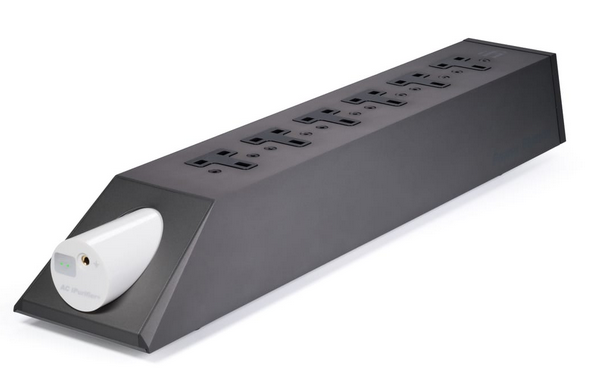
iFi Audio PowerStation and AC iPurifiers: Good for small systems, doesn’t have Shunyata’s ultra-wide bandwidth filtration. It does counter EMI/RFI across the AC line and ground. Does reduce the high-frequency grunge that routers and modems inject into the AC line. It does absorb noise that the Niagara1000 would never touch but the Niagara still wins in broad AC filtration – wide frequency range from 3 kHz up to 1 GHz+ where the iFi AC may miss low-frequency line noise, harmonics, or switching artifacts. The Niagara is better at removing broad-spectrum grunge. The Niagara delivers current so if your powering a media converter or have one built into a router, the Niagara will maintain fast transients, while the iFIi may slightly dull dynamics.
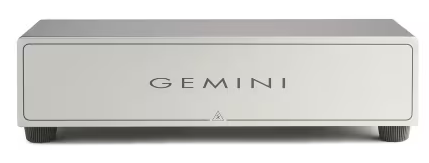
Shunyata Gemini: no surge but limits noise upstream into mains. Designed for what is plugged into it and outgoing noise which it does a little better then a Niagara. Even if your system is on a dedicated circuit it shares a common ground (rides along the ground plane), Designed to kill high frequency switching noise – this is exactly the kind in modems and routers and wall-wart powered gear – much more affective then Niagara, absorbs line noise, no current limiting, specifically engineered for digital sources and upstream isolation. Designed to block both incoming and outgoing noise. Provides outlet-to-outlet isolation or hard separation and CMode noise dissipation that the Niagara 1000 does not (two outlets, each isolated from the other but no zoned filtration). That mean that the noise from the modem will not affect the router or vice versa. That also applies to a fiber converter. Better at dumping high-frequency noise to ground then the Niagara models.
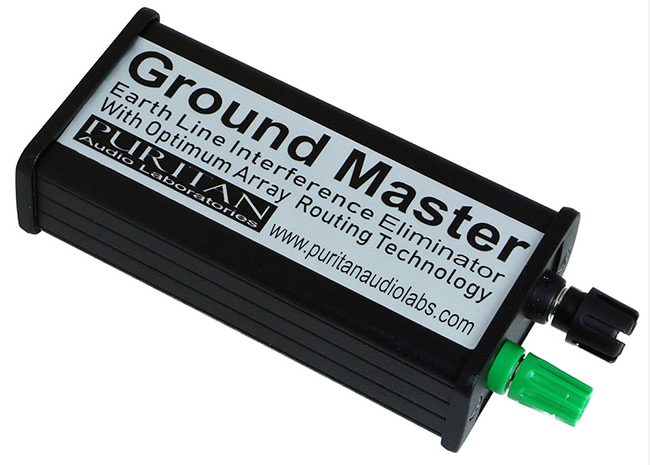
Puritan GroundMaster: doesn’t touch AC noise or common ground return
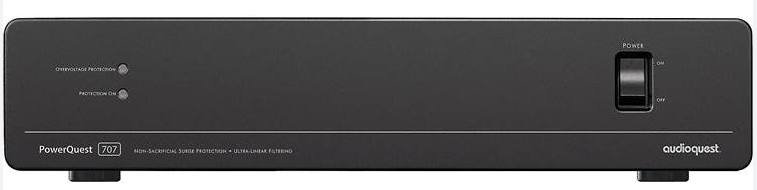
Audioquest 707: no level-X linear noise dissipation – Niagara 1200 is far more sophisticated and broadband extending deep into the MHz and GHz range where switching power supplies and Ethernet noise live. Not tuned for audiophile grade microdynamics where Niagara is designed for timing precision jitter and microdynamic clarity even at very low current levels (like with routers)
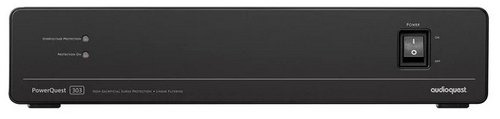
Audioquest 303: less advanced noise filtering then 707, simpler single-stage filter, offering only basic RFI/EMI suppression
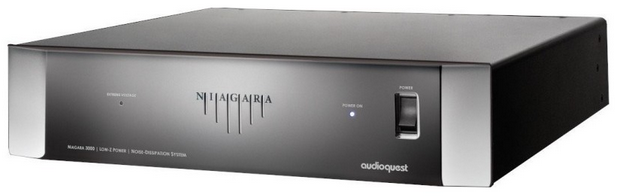
Niagara 3000: Used 1800-2500, could be overkill but not discontinued. Has individually isolated outlet banks so noise from one connected device (like a router) won’t bleed into another (like a mode or fiber converter). This along with it being more affective at broadband noise suppression or absorbing common-mode and differential-mode noise makes it a better choice over the Niagara 1000/1200. It is better designed to bleed RF noise to ground without polluting the shared AC line. This is vital when trying to stop noisy network gear and infecting the clean side. The Gemeni still rejects RF noise more efffectvely then the Niagara 3000 in certain high-freqnecy ranges espescially for smaller, noisy digital devices like modems, routers, and wall-wart powered switches. Also better at rejecting that RF noise and not letting that noise backwash into the AC line.
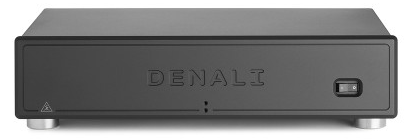
Shunyata Delani / Everest:
Could It Be Overkill? With multiple isolated zones, the Denali is ideal if you run more than two linear power supplies—because at this level, SMPS has no place in the chain. Example: FARAD Super10 on the modem, another on the router feeding fiber to the clean side, and a third linear supply powering a fiber converter to keep noisy Wi-Fi isolated from critical components. The result: >40–60 dB noise floor rejection, deeper suppression than the Gemini, and stronger common-mode and ground-plane noise dissipation. Denali offers greater filtering, isolation, and headroom—making it the top choice for serious upstream noise control.
Now that your cake is more tolerable, maybe we add a second “system” layer and fiber is the icing in the middle that blocks the noisy network gear (the bottom layer) from ruining the sweet stuff on top.
Step 2: Fiber Between Network Gear and your System
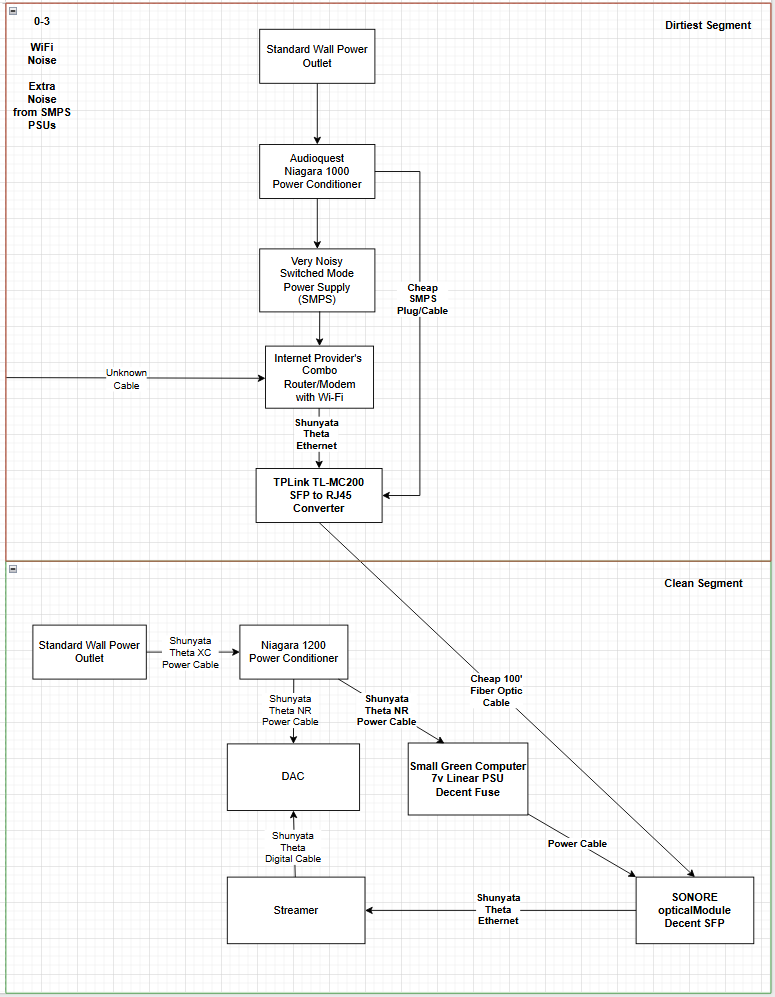
<changes in bold>
This step is game-changing, but the next best move—coming in Step 3—is segmenting Wi-Fi from your router.
Why This Matters:
The major advantage of using fiber is that it provides electrical isolation. It completely breaks the conductive path for noise, ground loops, and RF interference between your noisy upstream gear (modem, router, switch) and your sensitive downstream components (streamer, DAC, reclocker). It blocks common-mode noise, leaked SMPS hash, and ground-plane contamination.
Result:
Cleaner background, better imaging, more natural timbre, your not heading the garbage from your router’s switching noise or ground noise over Ethernet. Note: even with fiber isolation, your router and modem can still inject noise back into your home’s AC line. That is why Step 1 is so important, making sure you have a power conditioner on the dirty side blocks this noise from polluting the entire system.
Real-World Listening Test — 8/5/2025
Fiber Isolation vs. Direct Router Feed: A Study in Texture and Refinement
This evaluation was conducted under controlled, reference-system conditions to document the audible differences between a direct router connection and a fiber-isolated signal path.
Introducing a fiber isolation point into the digital chain yielded immediate and compelling benefits. Guitar strings took on a more natural, organic presence—less etched, more elegant—with improved harmonic bloom and decay. By contrast, feeding the system directly from the router produced a presentation that felt harder and brighter, with a somewhat artificial sheen. The noise floor appeared to rise, congesting the signal with excess electrical energy that bled into the musical texture.
The effect was especially telling on violin: through fiber, there was a clear increase in string texture—a sweetness and dimensionality that evoked a more lifelike performance. The sound emerged from a blacker background, with greater nuance and space between notes. Without fiber, dynamics remained, but much of the prior refinement was lost. Bowing gestures lacked grip and liquidity; transient edges appeared truncated or overly emphasized.
Even piano strikes revealed the contrast—fiber preserved their natural timbre, while the direct feed introduced a glassy overtone that felt disconnected from the instrument’s body.
Parts list, price and where to purchase:
Note: If underlined, these are hyperlinks that will take you to the location to purchase
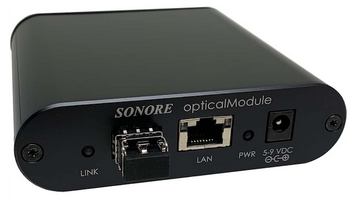
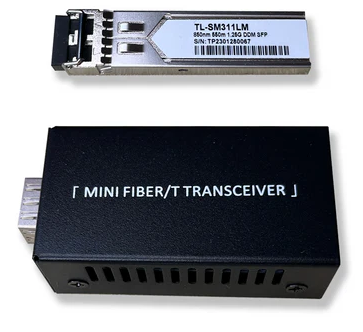
opticalModule Deluxe with SGC 7V LPSU & Fiber Ethernet Converter Bundle
$798 USD — occasionally available used on US Audio Mart or Audiogon
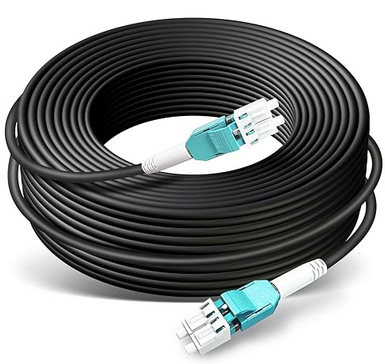
The kit includes a 1 m multi-mode fiber cable, so if your budget-friendly Small Green Computer Fiber Media Converter sits more than three feet from the opticalModule, you’ll need a longer run. In my case, I picked up an inexpensive 100′ cable on Amazon:
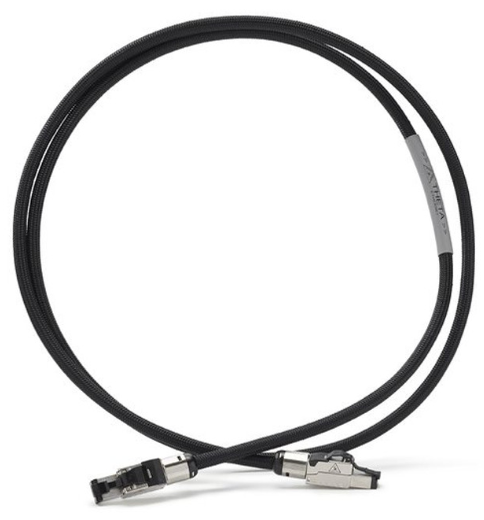
Shunyata – x1 Theta Ethernet Cable (1.5m)
Farnsworth Audio – (801) 580-8904 – Visit Farnsworth Audio
$500 x2: $1000
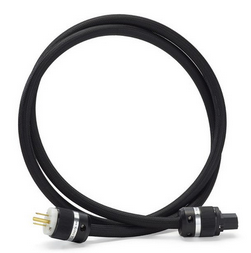
Shunyata – x2 Theta NR Power Cable (15A, 1.75m) – $998
Farnsworth Audio – (801) 580-8904 – Visit Farnsworth Audio
$998 x2: $1996
Total: $3844
Alternatives:
Budget Power Cables:
I wouldn’t recommend going with anything less than an opticalModule, as a high-quality unit on the clean side of your fiber kit can deliver a substantial audible improvement over a cheap TP-Link or Amazon-grade media converter—especially in noise floor, texture, and microdynamics. You can, however, save some money on power cables by opting for a less expensive Shunyata Venom V14 NR, or a used AudioQuest Monsoon or Blizzard.
Shunyta Venom V14 NR (My budget option): Often found for $200-300 new, Active noise reduction(NR tech). Budget version of Theta. Read slightly less warmth than Monsoon but clean and dynamic.
Farnsworth Audio – (801) 580-8904 – Visit Farnsworth Audio
AudioQuest Blizzard: Used around $500, has RF-drain technology and solid core connectors
AudioQuest Monsoon: Used around $300, similar grounding and directionality tech as Theta. Even more affordable then Blizzard
AudioQuest NRG-Z3: Used around $100, entry-level solid-core design, lacks the heavier gauge and DBS of Monsoon, but still far better than stock cords. Great value.
Pangea Audio AC-14SE: Used $80, $130 retail – uses Cardas-grade copper, slim auge, but works well for digital front-end.,
Budget Ethernet Cables:
Supposedly, you can get 70-90% of the performance of a Theta Ethernet cable for a lot less. I’m a bit spoiled so I went up to Omega-X/Sigma-X but you could always start cheap and move up. The important thing is you choose wisely. Focus on cables that minimize shield-induced ground noise, have quality terminations, and are build for low RF leakage.
I love my Omega-X/Sigma-X, so much more natural and organic over my old Audioquest Diamond so it is hard for be to recommend anything under Theta. On a budget, my pick would be to try Fidelizer, SOtM or Neotech over Audioquest
Fidelizer EtherStream or EtherStream II: $150-250. Supposedly warm, fatigue-free, flows beautifully. I need to test.
SOtM dCBL-CAT7: $350 but often on sale or used – tunes for audiophile use. Sounds more natural than mose CAT7/8 cables. Supposedly more analog than Theta – less aggressive but still clean. I need to test.
Neotech NEET-1008 or NEET-1000 DIY: $100-200 (DIY or prebuilt) – UPOCC copper, good shielding. Supposedly very natural, neutral tone, smooth and efeortless sound without glare – closer to analog cable voicing. I need to test.
Shunyata Gamma Ethernet: $425 new. Not that much of a savings over Theta. With Theta, you get a higher-purity OFE copper, advances shield geometry, greater microdynamic detail, openness, black background. I would stick with Theta
AudioQuest Cinnamon or Vodka Ethernet: Used $50-300. Vodka sounds more open versus Cinnamon but I find the Vodka less natural then the Shunyata alternatives. Do love the resolution
Better SFP Modules
Why This Matters:
The consensus is that single mode SFP is better and specifically certain brands/models make a difference.
Just take a look at this thread (thank you Rob C. for pointing it out):
Whats Best Forum: SFP Rolling? Anyone? – Page 6
Audiobomber: “Try replacing one Finisar FTLX1475D3BTL with a Finisar FTLF1318P3BTL. The combo was the magic trick, for me and a couple of others who also tried.”
Reading this thread, it seems like there are many SFPs I would love to try.
Alternatives:
Go ahead and order the same kit from Small Green Computer—you can repurpose the multi-mode SFP modules later when you segment your Wi-Fi for another substantial performance gain.
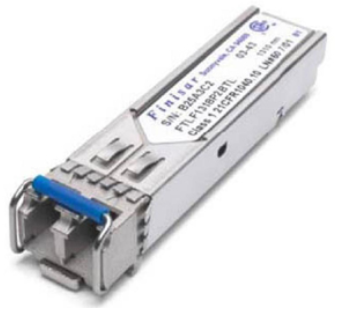
Finisar FTLF1318P3BTL SFP Modules x2: from $50-100 each off of Ebay
These SFP modules are supposed to sound better than cheap Multi-Mode SFPs. They have lower internal noise – cleaner power regulation = less noise into your streamer/DAC, cleaner optical signal – less jitter and distortion than multi-mode, better build quality – less EMI and ground noise leakage. All of this supposedly this gives you a lower noise, smoother textures, and less digital glare – especially onn the clean side of you fiber kit. I would order two to stay consistent. That is what I just did to compare to my cheap Olycom multi-mode SFPs. I’ll create a new article on this comparison soon.
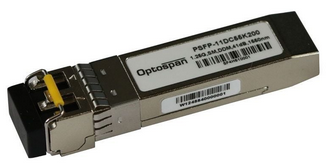
OptoSpan PSFP-11DT31K002 x2: $156 retail each.
Supposedly are known to have lower EMI output – for tighter shielding and less RF leakage then typical enterprise SFPs and less electrical noise = less contamination into the Ethernet port feeding your DAC. Better Internal regulation – built with stable internal power and clock circuits – this reduces jitter and minimizes high-frequency “hash”, which can otherwise leak into your audio system via ground or data lines. More natural sonic signature – in side-by-side listening tests, from forums and user feedback, OptoSpan tends to sound more organic, less fatiguing and with better tone and spatial texture than Finisar. Finisar is still supposedly great but it’s not specifically optimized for minimizing EMI in audio chains.
Sanspot: OptoSpan PSFP-11DT31K002 – SFP 2 km transceiver | Cisco Compatible 1G LX Ethernet
$156 retail
You will need a single-mode fiber cable instead of multi-mode:
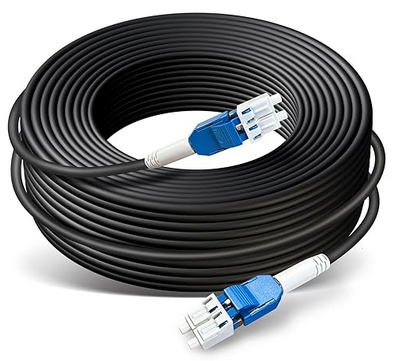
Amazon: 100ft/30m OD-5mm Industrial TPU OS2 LC to LC Outdoor Armored Fiber Optic Cable, Duplex Single Mode Fiber Patch Cable, 9/125um Uniboot LC Fiber Direct Bury
$46
Expensive Single Mode Fiber Patch Cable I need to try:
LC-LC LCElite Low-Loss Cable 3 Meter 9/125 Single-mode Duplex
Sanspot: LC-LC LCElite Low-Loss Cable 3 Meter 9/125 Single-mode Duplex
$50 for 10′
Your modem and router and Wi-FI are the bottom later of your cake – dence and noise, full of energy and potential mess. If the bottom layer is too wet, noise, full of energy and potential mess.
By segmenting off Wi-Fi, isolating it with fiber, or powering it separately, you’re adding a clean cake board between the layers – stopping that lower mess from reaching the top. The end result is a cleaner, more stable foundation that lets the top layer (your music) shine – with no noise bleeding from the base.
Step 3: Segment Out Your Wi-Fi
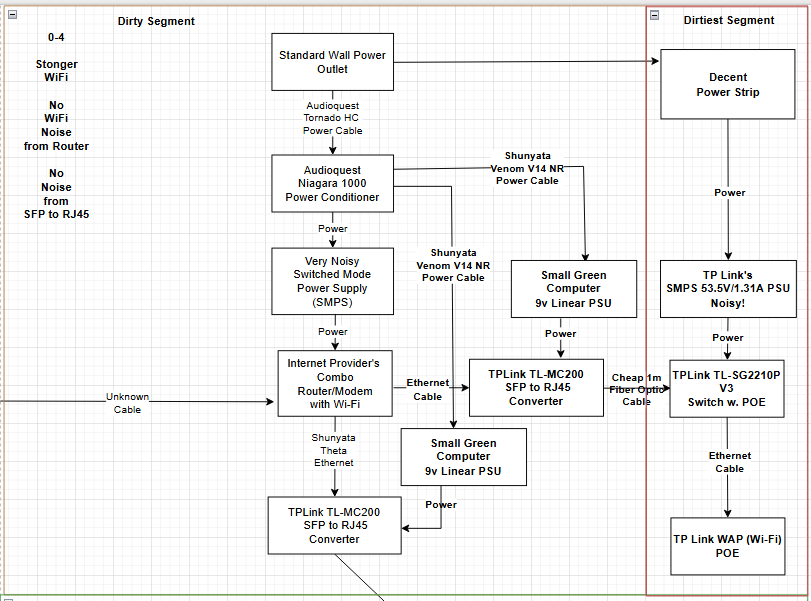
<changes in bold>
This second stretch of fiber segmenting out your Wi-Fi is also huge!
Why This Matters:
Breaking Wi-Fi onto its own switch and isolating it with fiber prevents RF noise from Wi-Fi chips and antennas from contaminating your audio chain. To power an external wireless access point (WAP), you’ll need a PoE switch—but be aware, PoE switch power supplies are among the worst noise offenders. These high-wattage SMPS units output strong, wide-band electrical noise—often worse than typical wall warts—because they must deliver both power and data simultaneously. Without fiber isolation, that noise can leak through Ethernet cabling and pollute your system.
Also, when Wi-Fi is isolated with fiber, it breaks groups loops and AC leakage paths through Ethernet. You might think the first fiber between the router and your streamer blocks AC leakage and noise but it can still sneak through through shared AC ground, poor SFP module shielding and power supply noise coupling. The isolation lowers jitter and noise at your streamer/DAC by keeping noisy traffic away. It keeps your audio chain stable, even when Wi-Fi is slammed by traffic or interference.
Result:
Isolating your Wi-Fi with fiber yields cleaner sound, improved timing, and fewer artifacts—simply by keeping noisy wireless components away from sensitive audio gear. When we turned off Wi-Fi on my friend’s combo modem/router and segmented it with fiber, the entire group heard a deeper, more holographic soundstage. I experienced the very same improvement when making the change in my own system.
While we are at it:
This is also the perfect time to eliminate all switched-mode power supplies (SMPS) on the dirty-side power conditioner for another performance boost. Remember—every SMPS is a noise source. Ideally, there should be only one left in your entire system, placed in what I call the “dirtiest” segment, isolated by the second fiber switch that feeds your PoE switch.
Note: Be sure to disable the internal Wi-Fi on your combo modem/router—if left active, it completely undermines the benefits of adding the fiber-isolated Wi-Fi segment.
Parts list, price and where to purchase:
Small Green Computer – x2 SGC 5V-9V Linear Power Supply 25W = 9V version
Retail price $199 x2: $398 Total
Amazon: 2 Pack 1.25G 850nm Multimode SFP LC Transceiver Fiber Module 550 Meters 1000Base-SX LC MMF for Cisco GLC-SX-MMD/SX-MM/SFP-GE-S,Fortinet,Ubiquiti UniFi UF-MM-1G,Mikrotik S-85DLC05D Meraki MA-SFP-1GB-SX
Retail price $26
Note: If you purchased some better SFP modules in Step 2, you might still have the modules your Small Green Computer fiber kit shipped with, you can use these instead of purchasing these.
Amazon: FiberCablesDirect LC-LC OM3 Fiber Patch Cable – 10Gb Duplex 50/125µm Multimode Corning Glass | 1M (3.28ft) | Bulk Networking, Data Centers, Telecom, Enterprise Applications
Retail price $9
Note: If you need longer the 3.28ft, order a longer length
TP-Link TL-SG2210P V3 Jetstream 8-Port Gigabit Smart PoE+ Switch with 2 SFP Slots (Supports 8 Gigabit PoE Ports, 58W Budget, Fanless)
Retail price $138
Cable Matters 10Gbps Snagless Shielded Cat 6A Ethernet Cable – 7ft, Cat 6A Cable, Cat6A Cord, Ethernet Cord, Black
Retail price $8 x2: $16 Total
Shunyata – Venom V14 NR Power Cable: $350 new
Retail price $350 x2: $700 Total
Farnsworth Audio – (801) 580-8904 – Visit Farnsworth Audio
Total: $1455
Alternatives:
The dirty side is the bottom layer of your cake – even if it’s hidden, a bad layer (cheap TP-Link TL-MC-200) can still leak bitterness upward.
Alternative 1: Medium-Tier
Purchase a second SONORE opticalModule for the converter feeding the clean side of your system from Step 2, and relocate the TP-Link TL-MC200 from that position to the segment powering your Wi-Fi—your “dirtiest” zone. Pair it with a Shunyata Theta NR power cable feeding the SGC 7 V linear PSU, just as recommended for the clean-side opticalModule.
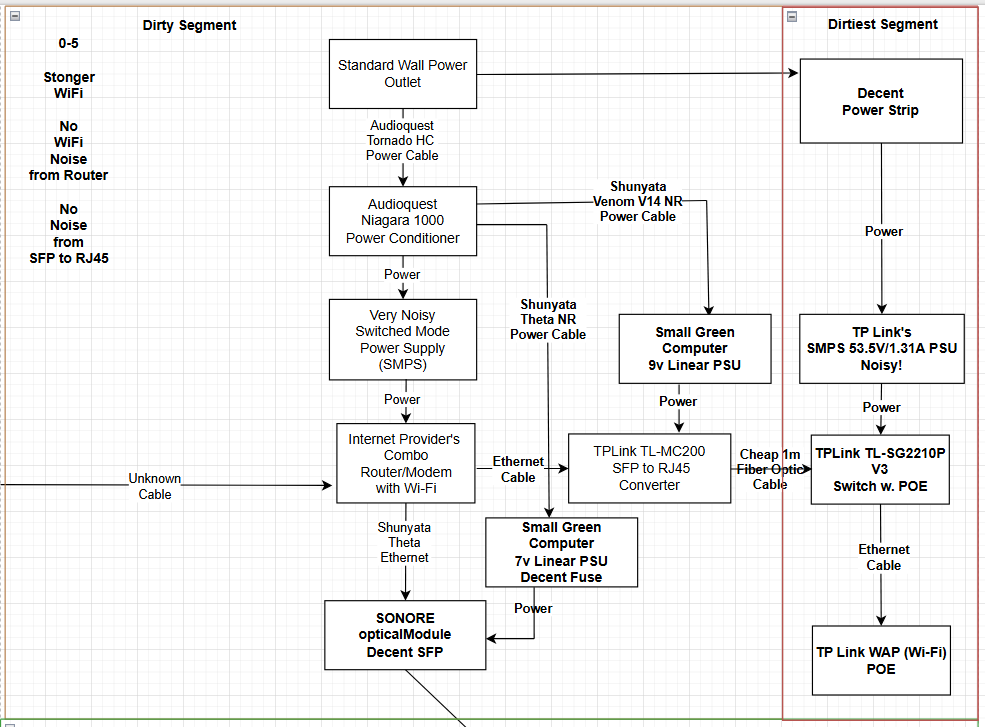
<changes in bold>
HIGHLY RECOMMENDED and only $1141 more: $2546 Total
You might wonder why you’d need anything better than the inexpensive TP-Link fiber converter, especially if you’ve been powering it with a quality SGC 9 V linear supply.
Reason:
The opticalModule is designed from the ground up with low-noise circuit layout, clean ground paths and short signal traces. TP-Link still has off-the-shelf switching Ethernet chipsets, longer PCB traces and basic filtering. The LPS helps, but it can’t fix internal design flaws or surpress chip-level noise. The TP-Link puts out more noise and jitter than the OpticalModule. It is cleaner, better shielded, and designed for audio, so it gives you a quieter optical signal and less pollution into your system – even on the dirty side.
I recommend the Shunyata Theta NR at this stage as it gives cleaner power to the LPS feeding your opticalModule, reducing high-frequency noise, AC contamination. Even on the dirty side, it helps the fiber module output a quieter, lower-jitter optical signal, which means better sound on the clean side.
NOTE: I value the Theta NR so highly that I chose it over an AudioQuest Dragon Source feeding a FARAD SuperATX power supply—that’s saying something. The Theta simply sounds more natural. I still use Dragon Source cables elsewhere in my system, but in this position, the Theta NR wins.
Note: Be sure to disable your combo modem/router’s built-in Wi‑Fi—otherwise, you’ll completely defeat the purpose of isolating Wi‑Fi on its own fiber-segmented path.
Revised parts list, price and where to purchase:
PLEASE NOTE: If you skipped “Step 2: Fiber Between Network Gear and your System” you will also need to purchase those parts
opticalModule Deluxe with SGC 7V LPSU. No Fiber Ethernet Converter Bundle
$719 USD. Can sometimes pick up used on US Audiomart or Audiogon
Small Green Computer – x1 SGC 5V-9V Linear Power Supply 25W = 9V version
Retail price $199
Amazon: 2 Pack 1.25G 850nm Multimode SFP LC Transceiver Fiber Module 550 Meters 1000Base-SX LC MMF for Cisco GLC-SX-MMD/SX-MM/SFP-GE-S,Fortinet,Ubiquiti UniFi UF-MM-1G,Mikrotik S-85DLC05D Meraki MA-SFP-1GB-SX
Retail price $26
Note: If you purchased some better SFP modules in Step 2 (alternatives), you might still have the modules your Small Green Computer fiber kit shipped with, you can use these instead of purchasing these.
Amazon: FiberCablesDirect LC-LC OM3 Fiber Patch Cable – 10Gb Duplex 50/125µm Multimode Corning Glass | 1M (3.28ft) | Bulk Networking, Data Centers, Telecom, Enterprise Applications
Retail price $9
Note: If you need longer the 3.28ft, order a longer length
TP-Link TL-SG2210P V3 Jetstream 8-Port Gigabit Smart PoE+ Switch with 2 SFP Slots (Supports 8 Gigabit PoE Ports, 58W Budget, Fanless)
Retail price $138
Cable Matters 10Gbps Snagless Shielded Cat 6A Ethernet Cable – 7ft, Cat 6A Cable, Cat6A Cord, Ethernet Cord, Black
Retail price $8 x2: $16 Total
Shunyata – Theta NR Power Cable
Retail price $998
Farnsworth Audio – (801) 580-8904 – Visit Farnsworth Audio
Shunyata – Venom V14 NR Power Cable: $350 new
Retail price $350
Farnsworth Audio – (801) 580-8904 – Visit Farnsworth Audio
Alternative Total: $2596
The clean side is the top layer of your audio cake – where flavor matters most. A cheap switch adds noise like stake frosting.
Alternative 2: Top-Tier
Purchase a SoTM sNH-10G switch with all available options for use on the clean side where your fiber terminates, and relocate the SONORE opticalModule to the position previously occupied by the TP-Link TL-MC200 in Step 2. The TL-MC200 will then move to the segment feeding your Wi-Fi—your “dirtiest” zone. Use a Shunyata Theta NR power cable to feed the SGC 7 V linear PSU, as we now do on the clean side, but in this case, the Theta will power a FARAD Super6 delivering ultra-clean DC to the SoTM switch.
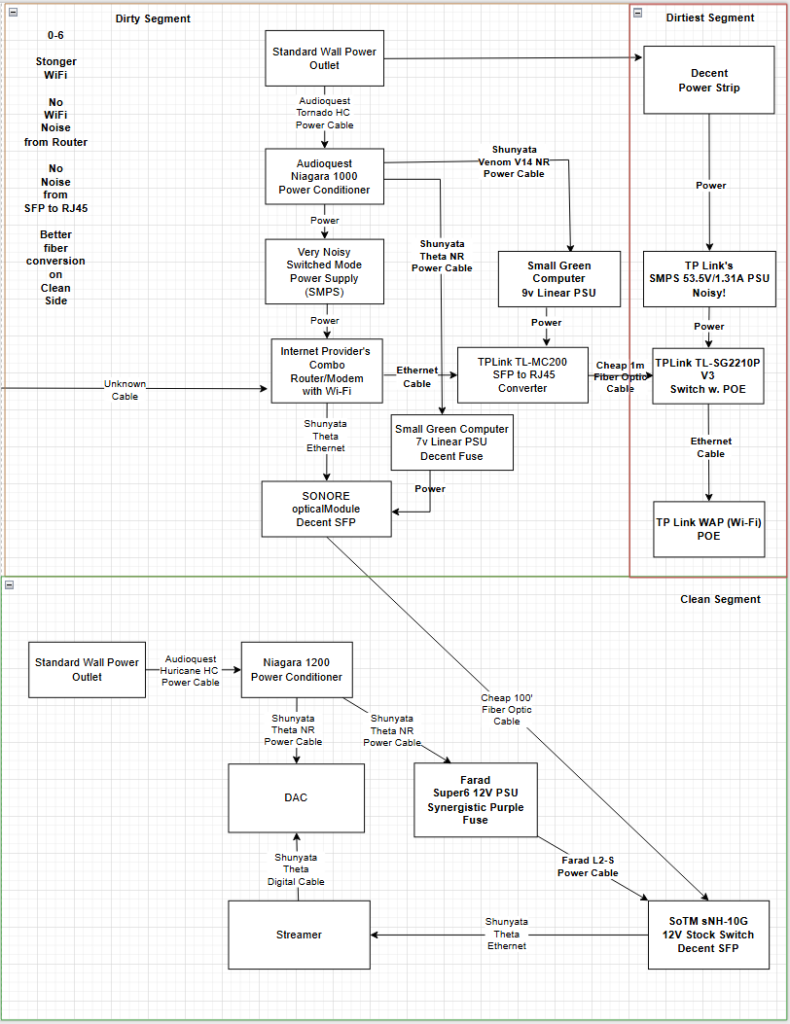 <changes in bold>
HIGHLY RECOMMENDED
You might wonder why you’d need anything beyond a SONORE opticalModule on the clean side of the fiber kit, given that it’s purpose-built for the discerning audiophile and already paired with a quality SGC 7 V linear power supply.
Reason:
After fiber isolation, noise is reduced – but jitter and signal timing are still critical. Paring the SOtM sNH-10G with a FARAD Super6 reclocks and purifies the Ethernet signal, while the FARAD delivers ultra-stable, low-noise power. Together they create a cleaner, more natural sound than a simple converter like the Sonore opticalModule can achieve. Compared to original suggestion, the SOtM/FARAD combination delivers dramatically cleaner, more refined sound than a cheap TP-Link TL-MC200 fiber converter which only isolates – it doesn’t reclock, clean power, or preserve timing. The difference is real and audible on a high-end system.
We are also suggesting FARAD’s silver DC cable over the copper as it offers better conductivity and faster transient response, which can translate into more detail, air, and clarity – especially in revealing systems. It’s ideal when you want to extract the last bit of performance from your Farad-powered components.
Don’t forget, on the dirty side, the opticalModule is designed from the ground up with low-noise circuit layout, clean ground paths and short signal traces. TP-Link TL-MC200 still has off-the-shelf switching Ethernet chipsets, longer PCB traces and basic filtering. The LPS helps, but it can’t fix internal design flaws or suppress chip-level noise. The TP-Link puts out more noise and jitter than the OpticalModule. It is cleaner, better shielded, and designed for audio, so it gives you a quieter optical signal and less pollution into your system – even on the dirty side.
The inexpensive TP-Link TL-MC200 is a fine starting point for achieving fiber isolation and is far superior to running straight Ethernet from your router to your streamer. However, in a top-tier system, its role should be limited to bridging fiber to a PoE switch that powers a wireless access point (WAP). No critical audio data should pass through this segment—only non-audio traffic such as streamer control from a tablet or phone, or AirPlay over Wi-Fi. Streaming audio travels directly from the modem to the router and then onward through the clean path.
Even on the dirty side, powering the TP-Link with an SGC 9 V linear supply helps. A linear PSU reduces high-frequency noise and backflow into the AC line, preventing the TP-Link from injecting interference into your ISP’s combo modem/router—interference that could otherwise degrade upstream signal integrity and increase jitter before fiber isolation.
Note: Be sure to disable your combo modem/router’s built-in Wi-Fi—leaving it active undermines the entire purpose of isolating Wi-Fi on its own fiber-segmented path.
Your not just isolating – you’re elevating the final signal feeding your DAC or streamer.
Revised parts list, price and where to purchase:
PLEASE NOTE: If you skipped “Step 2: Fiber Between Network Gear and your System” you will also need to purchase those parts
SoTM sNH-10G High-End Audio Switch Hub (with the sCLK-EX clock & master clock input – optional (12v) and upgraded 7N-UPOCC internal silver wires – EVOX capacitors – eABS200)
Note: You want the better internal sCLK-EX clock but choose the correct master clock input. i.e. 75ohm in case you want to try in the future. I am not syncing mine to a reference clock at the moment.
Retail price $2000
Direct from: SOtM USA
or
Farnsworth Audio – (801) 580-8904 – Visit Farnsworth Audio
Farad Super6 Power Supply – 12V – Farad L2-S Cable
Retail price around $2150 depending on the value of the Euro
Direct from: Farad Power Supplies
or
Farnsworth Audio – (801) 580-8904 – Visit Farnsworth Audio
Amazon: 2 Pack 1.25G 850nm Multimode SFP LC Transceiver Fiber Module 550 Meters 1000Base-SX LC MMF for Cisco GLC-SX-MMD/SX-MM/SFP-GE-S,Fortinet,Ubiquiti UniFi UF-MM-1G,Mikrotik S-85DLC05D Meraki MA-SFP-1GB-SX
Retail price $26
Note: If you purchased some better SFP modules in Step 2 (alternatives), you might still have the modules your Small Green Computer fiber kit shipped with, you can use these instead of purchasing these.
Amazon: FiberCablesDirect LC-LC OM3 Fiber Patch Cable – 10Gb Duplex 50/125µm Multimode Corning Glass | 1M (3.28ft) | Bulk Networking, Data Centers, Telecom, Enterprise Applications
Retail price $9
Note: If you need longer the 3.28ft, order a longer length
TP-Link TL-SG2210P V3 Jetstream 8-Port Gigabit Smart PoE+ Switch with 2 SFP Slots (Supports 8 Gigabit PoE Ports, 58W Budget, Fanless)
Retail price $138
Cable Matters 10Gbps Snagless Shielded Cat 6A Ethernet Cable – 7ft, Cat 6A Cable, Cat6A Cord, Ethernet Cord, Black
Retail price $8 x2: $16 Total
Shunyata – Theta NR Power Cable
Note: I like an Audioquest Dragon Source in this location. I expect Theta to be excellent in this location as it was on the FARAD SuperATX
Retail price $998
Farnsworth Audio – (801) 580-8904 – Visit Farnsworth Audio
Shunyata – Venom V14 NR Power Cable: $350 new
Retail price $350
Farnsworth Audio – (801) 580-8904 – Visit Farnsworth Audio
Total: $5828
The dirty side is like the bottom cake layer: if you bake in cheap ingredients (switching power supplies and clocks), those flavors bleed upward, no matter how clean your top layers are.
Alternative 3: The Ultimate with Primo Options
You’ve come this far—why stop now? At this stage, it’s time to fully embrace the descent into audiophile madness. This is how I brought my streaming files as close as possible to the quality of my server-optimized flat file playback.
Invest in a FARAD Super10 for your ISP’s modem/router and upgrade to a better router powered by a 12 V FARAD Super3. This combination eliminates all SMPS units from contaminating your dirty-side AC mains, while delivering a host of other performance benefits. After all, your dirty side deserves to be every bit as clean as the environment where your system resides.
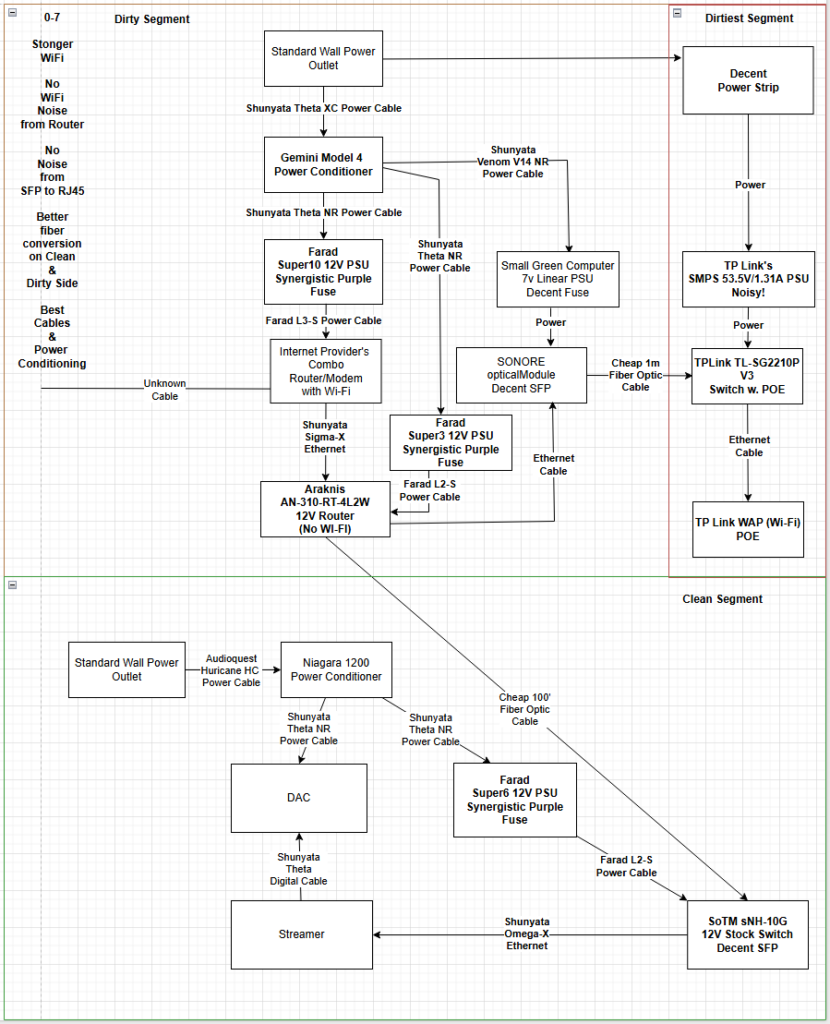
<changes in bold>
For the audiophile striving for the very best—seeking streaming playback that rivals a local file, matches a top-tier CD transport, and edges ever closer to the magic of a reference-grade analog vinyl rig.
HIGHLY RECOMMENDED if you can splurge
So again, you might ask—if I’m already using a SONORE opticalModule on the dirty side of the fiber kit, and it’s purpose-built for audiophile use, why would I need anything better? Wouldn’t the fiber link eliminate any remaining issues? And while we’re at it, why invest in an expensive FARAD PSU for my ISP’s modem and another FARAD PSU for the router that sends fiber from the dirty side to the clean side?
Reason:
By replacing the ISP’s combo unit with a dedicated router only Araknis, you get lower-jitter clocking, cleaner power regulation, and superior EMI/RFI suppression at the nework front end, reducing nooise that ride the signal throug the fiber into the clean side. Even with Wi-Fi disabled on the combo modem/router, the RF front-end, switching regulators, and idle radios in a combo unit still generate noise. The Araknis simply lacks that extra circitry, so there’s less EMI/RFI polluting the signal path befoer the fiber handoff. The Farad Super3 we are suggesting also deivers far lower noise, tighter regulation, and better RF supression than the budget SGC LPS, giving the Araknis a cleaner, more stable supply and reducing jitter before the fiber handoff.
Even with the ISPs combo modem/router active as jsut a modem, the stock SMPS leaks noisel a Farad Super10 delivers ultra-clean, stable power, keeping tha noise out of your network and fiber feed. Even with fiber isolation, removing the stock SMPS cuts on the shared AC ground, reducing interference that can still leak into your system.
You would think a FARAD Super3 would be enough on your ISPs combo modem/router but the Super10 not only delivers cleaner power but its larger supercapcitor bank and higher current headroom handle sudden load changes better than a Super3 or Super6, firther lowering noise and jitter at the souce. Because the modem is the first gatekeeper of every bit you hear, and noise, jitter, or timing instability it adds is baked into the stream before it ever reaches your clean side. Powering it with something like a FARAD Super10 turns that “cheap” cobmo box into a quite, stable, low-jitter source, preservving musical detail from the very first packet.
I explored the topic of how better power supplies improve the sound even if seperated by fiber in my earlier article which you can fine here:
Beyond Isolation: How Upsteam Power Still Shapes Sonic Reality
You might also assume that the inexpensive TP-Link fiber converter would be sufficient for sending data to the dedicated “dirtiest” Wi-Fi segment. However, the SONORE opticalModule’s higher-grade clocking, cleaner Ethernet transceivers, and superior isolation block far more noise from riding back over Ethernet into the Araknis—and from there leaking through its PSU into your dirty-side power conditioner. It’s a level of protection the cheaper TP-Link simply can’t match, even when powered by the same SGC linear supply.
At this level, I also recommend considering the following upgrades:
Shunyata Sigma-X Ethernet (dirty side)
Between modem and router, the Sigma-X Ethenet has better shielding, lower impedence, and more advances noise-dissipation tech than the Theta-X, cutting more RF and timing errors bfore the signal even hits your fiber link.
Shunyata Omega-X Ethernet (clean side)
Even on the clean side of the fiber switch, both the Omega-X and Sigma-X clearly outperform the Theta-X with higher-purity conductors, stronger shielding, and superrior noise dissipation. The Omega-X delivers richer tone and weight, while the Sigma-X lowers the noise floor and sharpens spatial detail-two distinct upgrades, both well ahead of the Theta-X
I explored this topic in more detail in my earlier article which you can find here:
Testing Shunyata’s Omega-X and Sigma-X Ethernet Cables in a Fully Optimized Digital Chain
Better Power Conditioning on the Dirty Side
On the dirty side, the Shunyata Gemini is purpose-built for high-current, noise-rejection duty. It provides stronger common-mode and differential-mode filtering, superior ground-noise suppression, and lower contact resistance than the Niagara 1000—giving your FARAD Super10 and Super3 a cleaner, more stable AC feed right at the very start of the chain. It ultimately became my final choice for this position.
Because we recommend the Gemini over the Niagara, we also suggest pairing it with the Shunyata Theta XC power cable. The Theta XC delivers faster transient response and a lower noise floor than the Hurricane HC, which isn’t optimized for use with Shunyata conditioners.
Note: Be sure to disable your combo modem/router’s built‑in Wi‑Fi—leaving it active undermines the entire purpose of isolating Wi‑Fi on its own fiber‑segmented path.
The Araknis with the FARAD Super3, paired with a Super10 on the modem, starts your fiber chain on a rock-solid, low noise foundation, free from the RF hash, jiter, and ground contamination of a noisy ISP combo box and bargain LPS-letting music flow with more clairity, texture, transient snap, and life from the very first packet.
If you’d like more detail on how each of these changes—from the SOtM switch to the FARAD power supplies to Wi-Fi segmentation—enhanced my system’s performance, you can find my earlier article here:
Upstream Unmasked: Exploring the Last Frontier of Digital System Tuning
Revised parts list, price and where to purchase:
PLEASE NOTE: If you skipped “Step 2: Fiber Between Network Gear and your System” you will also need to purchase those parts
SoTM sNH-10G High-End Audio Switch Hub (with the sCLK-EX clock & master clock input – optional (12v) and upgraded 7N-UPOCC internal silver wires – EVOX capacitors – eABS200)
Note: You want the better internal sCLK-EX clock but choose the correct master clock input. i.e. 75ohm in case you want to try in the future. I am not syncing mine to a reference clock at the moment.
Retail price $2000
Direct from: SOtM USA
or
Farnsworth Audio – (801) 580-8904 – Visit Farnsworth Audio
Farad Super6 Power Supply – 12V – Farad L2-S Cable
Retail price around $2150 depending on the value of the Euro
Direct from: Farad Power Supplies
or
Farnsworth Audio – (801) 580-8904 – Visit Farnsworth Audio
Araknis Networks® 310-Series Gigabit VPN Router
Retail price: $570 – various places on the Internet – talk to Farnsworth Audio
Farad Super3 Power Supply – 12V – Synergistic Purple Fuse – Farad L2-S Cable
Retail price around $1430 depending on the value of the Euro
talk to Farnsworth Audio about hard wiring the Super3 to the Araknis.
Direct from: Farad Power Supplies
or
Farnsworth Audio – (801) 580-8904 – Visit Farnsworth Audio
Farad Super10 Power Supply – 12V – Farad L3-S Cable
Retail price around $4314 depending on the value of the Euro
talk to Farnsworth Audio about the custom cable to your ISPs modem.
Direct from: Farad Power Supplies
or
Farnsworth Audio – (801) 580-8904 – Visit Farnsworth Audio
Possible ISPs Combo Modem/Router i.e. Fiber AT&T
talk to Farnsworth Audio about getting plug that works with Farad L3-S Cable
Used price from $50-200. Estimating $100 here.
Amazon: 2 Pack 1.25G 850nm Multimode SFP LC Transceiver Fiber Module 550 Meters 1000Base-SX LC MMF for Cisco GLC-SX-MMD/SX-MM/SFP-GE-S,Fortinet,Ubiquiti UniFi UF-MM-1G,Mikrotik S-85DLC05D Meraki MA-SFP-1GB-SX
Retail price $26
Note: If you purchased some better SFP modules in Step 2 (alternatives), you might still have the modules your Small Green Computer fiber kit shipped with, you can use these instead of purchasing these.
Amazon: FiberCablesDirect LC-LC OM3 Fiber Patch Cable – 10Gb Duplex 50/125µm Multimode Corning Glass | 1M (3.28ft) | Bulk Networking, Data Centers, Telecom, Enterprise Applications
Retail price $9
Note: If you need longer the 3.28ft, order a longer length
TP-Link TL-SG2210P V3 Jetstream 8-Port Gigabit Smart PoE+ Switch with 2 SFP Slots (Supports 8 Gigabit PoE Ports, 58W Budget, Fanless)
Retail price $138
Cable Matters 10Gbps Snagless Shielded Cat 6A Ethernet Cable – 7ft, Cat 6A Cable, Cat6A Cord, Ethernet Cord, Black
Retail price $8 x2: $16 Total
Shunyata – GEMINI Model-4 Power Conditioner
Retail price $2250
Farnsworth Audio – (801) 580-8904 – Visit Farnsworth Audio
Shunyata – Sigma-X Ethernet Cable – 1.5M
Retail price $2800
Farnsworth Audio – (801) 580-8904 – Visit Farnsworth Audio
Shunyata – Omega-X Ethernet Cable – 1.5M
Retail price $3800
Farnsworth Audio – (801) 580-8904 – Visit Farnsworth Audio
Shunyata – Theta XC Power Cable
Retail price $998
Farnsworth Audio – (801) 580-8904 – Visit Farnsworth Audio
Shunyata – Theta NR Power Cable
Note: I like an Audioquest Dragon Source in this location. I expect Theta to be excellent in this location as it was on the FARAD SuperATX
Retail price $998
Farnsworth Audio – (801) 580-8904 – Visit Farnsworth Audio
Shunyata – Venom V14 NR Power Cable: $350 new
Retail price $350
Farnsworth Audio – (801) 580-8904 – Visit Farnsworth Audio
Total: $22090
Primo Options:
FARAD Super10 on Araknis Router over Super3
“Larger more powerful sound. More dynamics and fullness”
— David W., Berkeley, CA, Aavik SD-880 Streamer/DAC owner
FARAD Super10 on SOtM switch over the Super6 with Omega-X NR power cable over the Theta NR
Shunyata Denali over Gemini for the dirty side’s power conditioning
Ansuz D3 Switch between SOtM switch and Streamer with extra Omega-X Ethernet and Omega-X NR power cable
Shunyata Sigma-X grounding cables for Gemini in dirty side
“Noise floor drops. Blacker backgrounds and more clarity and naturalness”
— David W., Berkeley, CA, Aavik SD-880 Streamer/DAC owner
Shunyata ALTAIRA Noise Reduction Grounding Hub if moving from a Gemini to a Denali on the dirty side
Shunyata Omega-X grounding cables for ALTAIRA on clean side
Shunyata Denali-X powering the clean side components with Omega-X QR power cable
Shunyata ALTAIRA Noise Reduction Grounding Hub on clean side
****Cable upgrades are like the frosting and decorations – delicate, detailed, and where all the attention goes.
Let Me Put Your Gear to the Test
I specialize in critical listening evaluations for serious audiophiles, using high-resolution dual-DSD recordings as part of my process. I’d like to review your product to see if it can match—or exceed—my current reference system. I’ll follow your setup guidelines, handle it with care, and return it promptly (with shipping covered by you both ways). In return, you’ll receive a detailed and honest assessment based on real-world use in a reference-grade system.
Few things get me more fired up than seeing new gear that can outperform the greats—and maybe even make world-class sound more affordable. Right now feels like a golden age for us passionate (and proudly crazy) audiophiles.
Unlock Your System’s Full Potential
At this level, you didn’t invest in a reference DAC, world-class amps, and rare analog sources just to have your streaming performance held back by hidden noise or tedious setup hurdles. I’ve handled it all—from modems and routers that refuse to “shake hands,” to optimizing the streamer and selecting the proper cables that let it perform at its best.
—problems that can drain your time and patience before you even press play.
For serious systems, the path to reference-grade streaming isn’t about trial and error—it’s about precision. I work with discerning audiophiles who prefer to bypass the frustration and go straight to results. If you want streaming playback that stands shoulder to shoulder with your finest analog sources, I can make it happen.
Schedule an up-stream digital make over today.
- Use our contact form and you will hear from me shortly
Our Approach to Digital Purity:
Upstream Unmasked: Exploring the Last Frontier of Digital System Tuning
 Acknowledgment
Special thanks to Michael Farnsworth of Farnsworth Audio for his continued support and guidance throughout this evaluation. His deep knowledge and curated product offerings—including Farad, Shunyata Research, and many other exceptional brands—made this review possible.
If you’re looking to elevate your system with expert advice and trusted service, I highly recommend reaching out:
Farnsworth Audio
 +1 (801) 580-8904
 Mike@farnsworthaudio.com
 Visit Farnsworth Audio (insert actual link if different)
Let’s Keep the Conversation Going
- Via the contact form on this site
- On X (formerly Twitter)
- On Facebook