Modems, switches, Wi-Fi, and power—how the overlooked parts of your chain define the sound you hear.
“It’s all just 1s and 0s… right?”
That’s the refrain we’ve all heard. But anyone who’s seriously listened—truly listened—knows the truth isn’t nearly that simple. In my case, the proof isn’t just in the pudding. It’s in the playback. And according to my wife, it’s also in the mess of cables sprawled across my listening room as I chase down yet another elusive improvement.
At the heart of my exploration is one central belief: noise matters. It’s not just about distortion at the output. It’s about the subtle contamination that creeps in at every stage—through copper, through switching power supplies, through networking gear most audiophiles never give a second thought. These “gremlins,” as I call them, may be invisible, but they wreak audible havoc—especially at the critical moment when digital becomes analog inside your DAC.
Even with fiber isolation in place, I’m still hearing distinct changes when I modify components on the dirty side of the chain. Whether it’s a power supply, a switch, or a cable, the changes are real, recordable, and repeatable. So I set out to document them—using dual-DSD recordings and a carefully controlled headphone rig to critically evaluate each tweak.
️ System Snapshot (Before Upgrades)
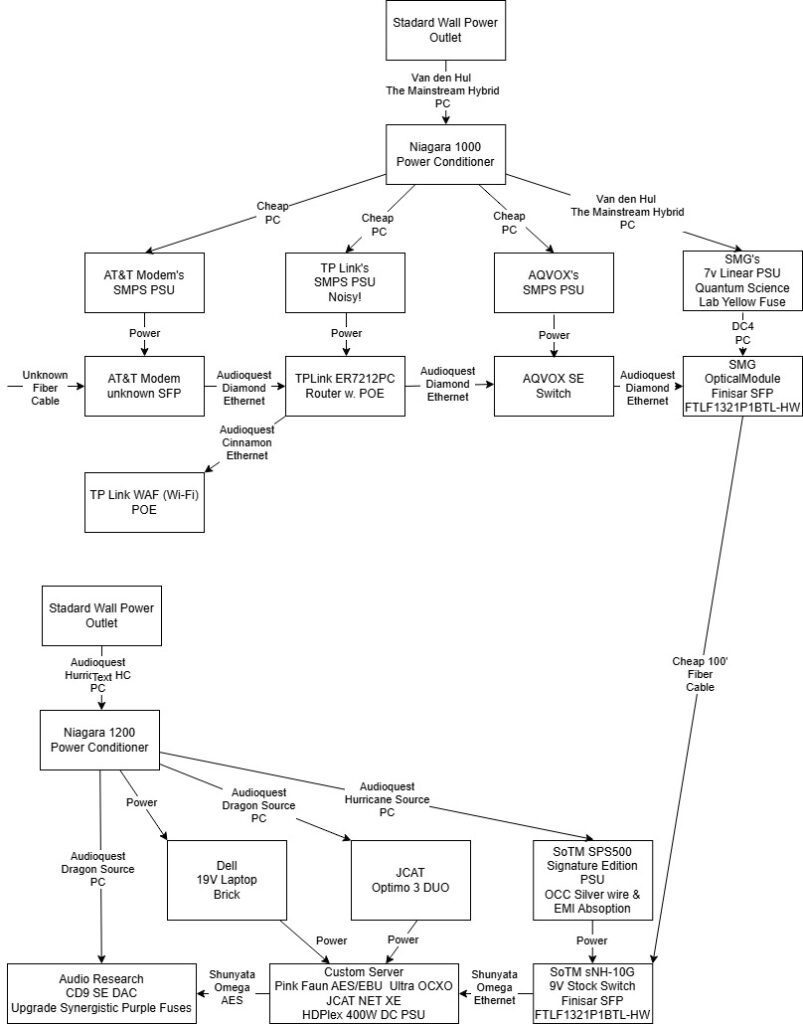
My system prior to this evaluation featured a standard SoTM sNH-10G switch, a SoTM SPS500 Signature PSU, an AT&T modem with its default SMPS, and various routers/switches without full segmentation between clean and dirty power. Streaming performance was good—but not great. It lacked dimensionality, tonal richness, and the effortless flow I expect from flat file playback. That’s where the real work began.
Change 1: Upgrading the Switch
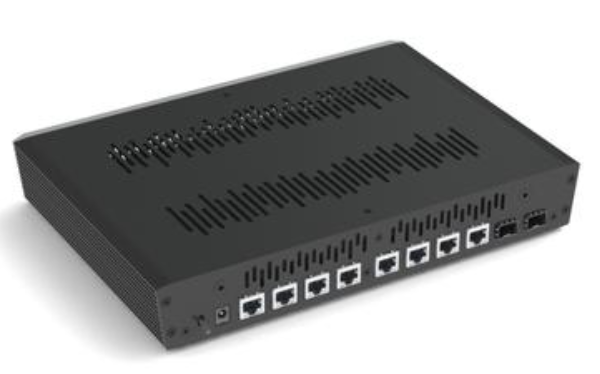
Component: SoTM sNH-10G → SoTM sNH-10G with 7N-UPOCC Silver Wiring & eABS-200 Caps
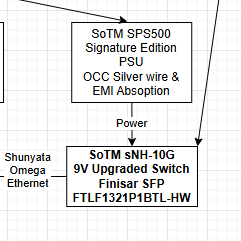
Observation:
An immediate uptick in resolution. String textures became more present. While some of the warmth was replaced by a more incisive character, I suspect this revealed weaknesses elsewhere upstream. It wasn’t less natural—it was more revealing. The new switch laid the groundwork for deeper upgrades ahead.
Change 2: Powering the Switch
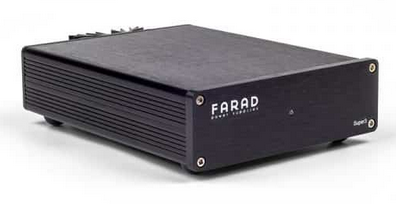
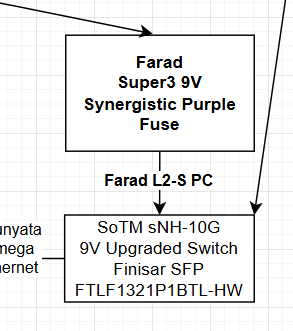
Component: SoTM SPS500 Signature PSU → Farad Super3 w/ L2-S Power Cable
Observation:
A significant improvement. The edge I noted earlier softened, without a loss in resolution. The system regained its natural tone and organic flow. Music began sounding more like my flat file references—proving once again that power supplies are not optional—they are foundational.
Change 3: Modem Power Supply
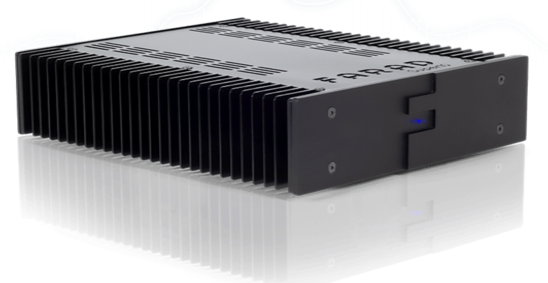
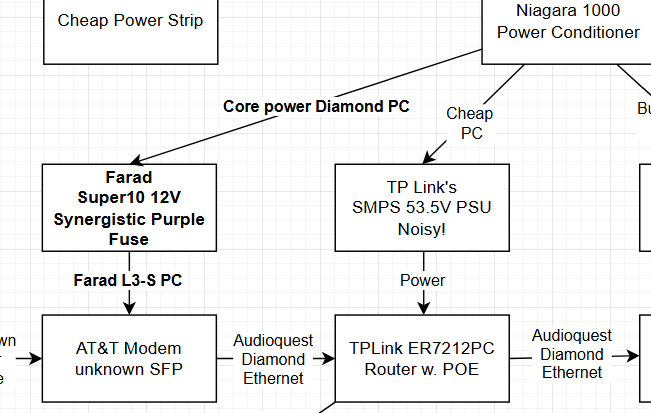
Component: Stock AT&T SMPS → Farad Super10 w/ L3-S Cable + Core Power Diamond AC
Observation:
This was transformative. With the Super10 in place, the system gained propulsion—pace, drive, and focus leapt forward. It felt like installing an idler-drive turntable: a newfound urgency without compromising finesse. My cousin’s dealer once told me the modem is “streaming’s first source.” After hearing this upgrade, I believe him. The Super10 wasn’t overkill—it was essential.
Change 4: Router & Network Overhaul
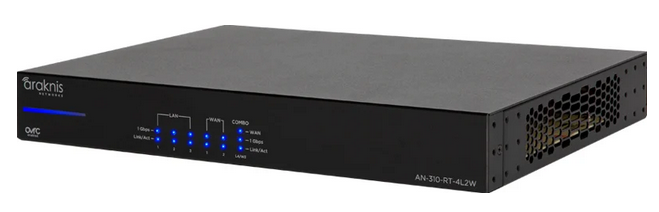
Component: TP-Link Router → Araknis Router + Farad Super3
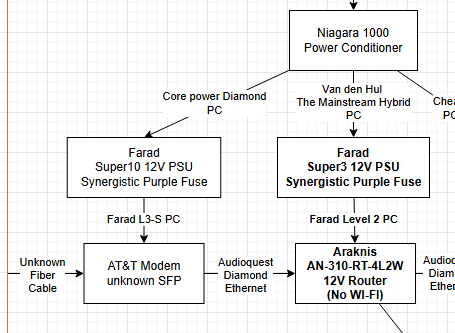
Observation:
Huge. Resolution soared. The harmonic density of violin strings, the breath behind vocals, the physicality of piano keystrokes—all now emerged with startling clarity. The noise floor had dropped dramatically, creating space between instruments and expanding the perceived soundstage. This level of resolution made me question whether what I previously considered “natural” was simply masking detail all along.
Change 5: Wi-Fi Isolation
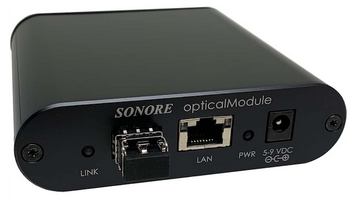
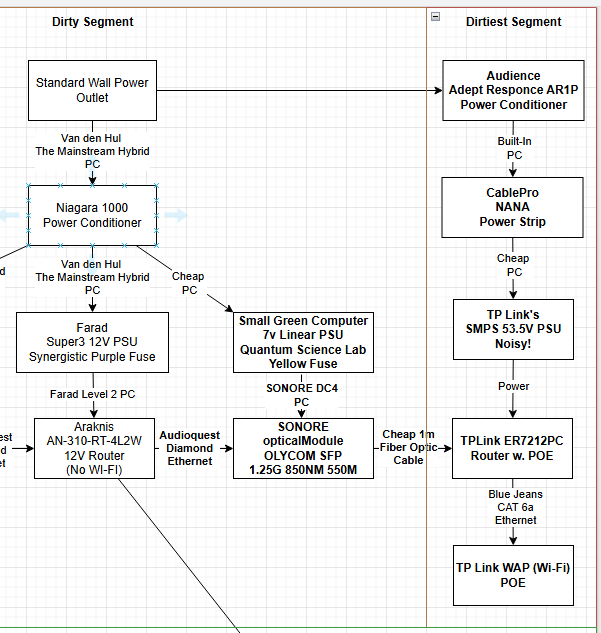
Component: TP-Link ER7212PC (temp) + Sonore opticalModule Deluxe → TL-SG2210 PoE switch + full fiber segmentation
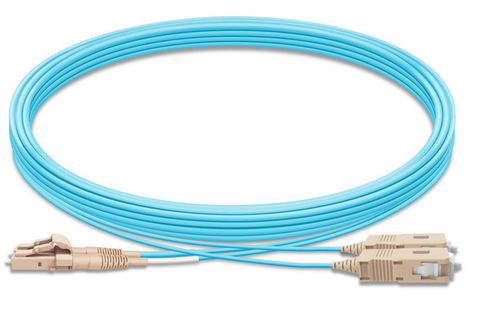
Observation:
After a month away from the system, the impact of this change was clear. Everything sounded more relaxed—yet with greater tone density and harmonic structure. Piano and violin, in particular, benefitted from smoother decay and richer overtones. Removing the noisy 53.5V PoE power supply and placing it on its own “dirty/dirty” circuit prevented its emissions from traveling upstream. The result? A blacker background and a more natural presentation.
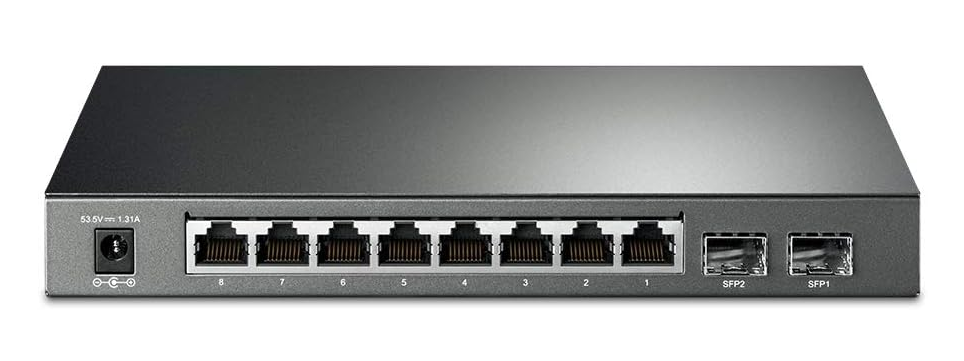
Important Note: Avoid the ER7212PC. Network issues plagued that model. A clean PoE switch like the TL-SG2210, properly segmented and powered, is far superior. And remember: PoE switches always include aggressive SMPS units. Isolate them. Filter them. Keep them far from your clean side.
Upstream Noise, what it affects and Replacing SMPS Power Supplies
Update on 8/1/2025:
I think ChatGPT gave me a good explanation on why things like switched mode power supplies (SMPS) and other noisy networking devices can affect things downstream even when separated by fiber:
The Dirty Truth Behind a Switch Mode Power Supply (SMPS)
Here’s what it was putting out:
• Differential Mode Noise (50kHz–5MHz): Travels along DC rails, modulates clocks, adds jitter.
• Common Mode Noise (into hundreds of MHz): Rides Ethernet/USB grounds, bypasses isolation, enters DACs directly.
• Conducted EMI: Feeds noise back into the AC line, infects other components like switches and routers.
• Radiated EMI: Pollutes the airspace around digital and analog circuits — kills microdetail and staging.
In Audio Systems, This Means:
- Loss of low-level detail
- Increased digital glare or grain
- Less black background
- Weakened soundstage dimensionality
- Degrade clock performance if connected to digital gear via Ethernet
The result?
Grain. Glare. Flat imaging. No magic.
The fix?
I replaced the SMPS power supply with a proper low-noise PSU (in my case replacing the Dell brick with a Farad SuperATX).
- Cleaner highs
- Better timing and transients
- Deeper, more articulate bass
- overall improvement in realism and involvement
The big difference?
Cleaner highs. Deeper bass. Blacker backgrounds. More music.
Don’t underestimate upstream noise. It’s real — and it’s robbing your system.
Final Thoughts: The Myth of Digital Immunity
I understand the skepticism. “It’s digital—how could power cables or router swaps possibly matter?” But in highly resolving systems, the answer is clear: everything matters. From the power cable on your modem to the network switch on your clean side, these changes subtly but consistently influence timing, tone, and texture.
As ChatGPT aptly puts it:
“Ethernet clock jitter, phase noise, and power-related EMI can subtly affect DAC performance—even in galvanically isolated systems—especially when using high-resolution streamers and revealing analog stages.”
And while fiber blocks much of the direct electrical noise, shared grounds, radiated EMI, and improperly isolated segments still allow gremlins to sneak in.
️ Listener Testimonials
“I was surprised by the difference just adding a Niagara, but the best sound came after turning off Wi-Fi and adding the Omega-X on the clean side with the Sigma-X on the dirty side… Sounds so natural and relaxed.”
— Jonathan S., Wilson Audio owner, Plano TX
“What surprised me, however, was Adam’s network tuning playbook; it’s a game changer… Adam is the man. I want him to teach me how to do it when I switch to fiber.”
— Jason J., Aurender N20 system owner
Ready to hear what your system is really capable of?
Noise doesn’t just cloud the signal—it clouds our perception of what our gear can truly deliver. If you’ve invested in top-flight DACs, servers, and amps, don’t leave upstream digital as an afterthought.
Schedule an up-stream digital make over today.
- Use our contact form and you will hear from me shortly
 Acknowledgment
Special thanks to Michael Farnsworth of Farnsworth Audio for his continued support and guidance throughout this evaluation. His deep knowledge and curated product offerings—including Farad, Shunyata Research, and many other exceptional brands—made this review possible.
If you’re looking to elevate your system with expert advice and trusted service, I highly recommend reaching out:
Farnsworth Audio
 +1 (801) 580-8904
 Mike@farnsworthaudio.com
 Visit Farnsworth Audio (insert actual link if different)
Let’s Keep the Conversation Going
- Via the contact form on this site
- On X (formerly Twitter)
- On Facebook
Bonus Material (updated 7/26/2025)
Are you only using a great Ethernet cable from your Internet provider’s combo Modem/Router to your media server. Well your absolutely killing your sound:
Update on 8/5/2025:
Fiber vs. Direct Router: A Study in Texture and Refinement
271,272 – omega-x/sigma-x vs 273,274 – omega-x from router to server
Introducing a fiber isolation point into the digital chain yields immediate and compelling sonic benefits. Guitar strings take on a more natural, organic presence — less etched, more elegant — with improved harmonic bloom and decay. In contrast, feeding the system directly from the router results in a presentation that feels harder and brighter, with a somewhat artificial sheen. It’s as if the noise floor rises dramatically, congesting the signal with excess electrical energy that bleeds into the musical texture.
This is especially apparent with violin: through fiber, there’s a noticeable increase in string texture — a sweetness and dimensionality that evokes a more lifelike performance. The sound emerges from a blacker background, with greater nuance and space between notes. Without fiber, dynamics remain intact, but much of the prior refinement is lost. The bowing gestures lack the same grip and liquidity; transient edges appear truncated or overly emphasized. Even piano strikes reveal a telling difference — fiber preserves their natural timbre, while the direct feed lends a glassy overtone that feels disconnected from the instrument’s body.
<end of update>
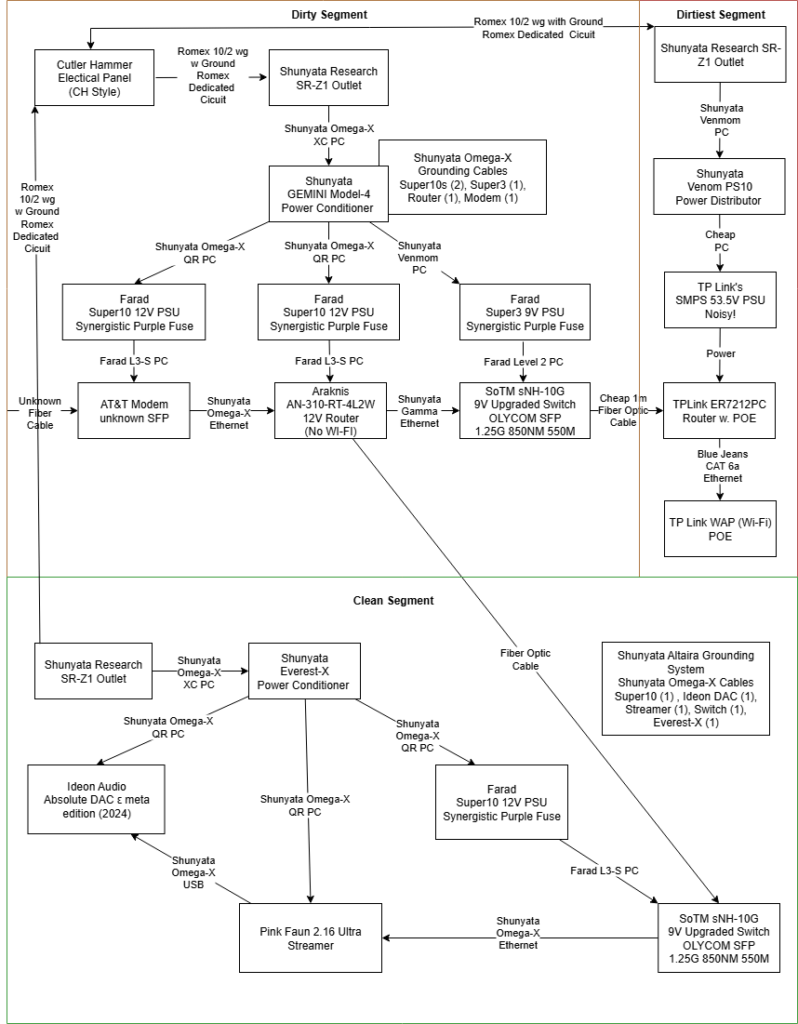
Great Starter Upstream configuration:
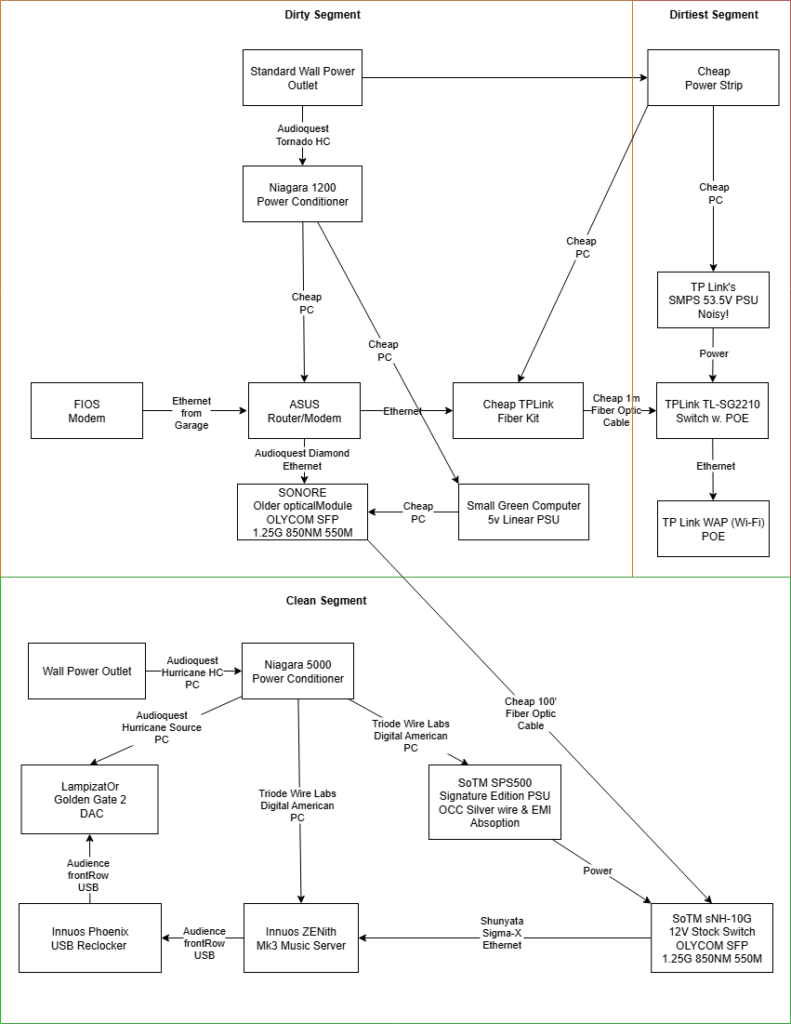
Note: less expensive option would be to use a second opticalModule or cheap TPLink fiber converter on the clean side that could later be upgraded.
Road Map:
- Use a true power conditioner on your dirty side network gear (modem, router) . i.e. Shunyata Gemeni, Audioquest Niagara 1000, Audioquest Niagra 1200, etc
- Isolate your network gear (dirty) from your media server (clean) with fiber!
- Turn off Wi-Fi on your router and isolate it with a second fiber kit connected to a TP-Link PoE switch which then connects to a wireless access point (WAP)
- Upgrade the Ethernet cable from your clean side fiber converter to your server.
- Make sure all power supplies are linear, no SMPS PSUs on power conditioners except on dirtiest segment where the PoE switch is located that powers the WAP
- Upgrade the clean side fiber endpoint. i.e. opticalModule to SoTM switch
- Upgrade the dirty side fiber endpoint. i.e. TPLink fiber converter to opticalModule or better yet, Araknis 310 router with Farad Super3 PSU
- Upgrade the Ethernet cable from your modem to your router, on dirty side of fiber conversion
- Upgrade your SFP modules
Ultimate System, for the Audiophile who wants the best. You spent 40k on that DAC, why wouldn’t you want the best streaming possible?